A till built for speed
Scan, type or tap. Every action has a key — F10 to pay, F1–F4 for cash, card, EFT and gift card — and big touch buttons for touch screens. Split tenders, cash back, holds and layaways included.

Ring up sales in seconds by barcode, keyboard or touch. Know exactly what is on your shelves, cash up without the guesswork, and close every day with numbers that add up.
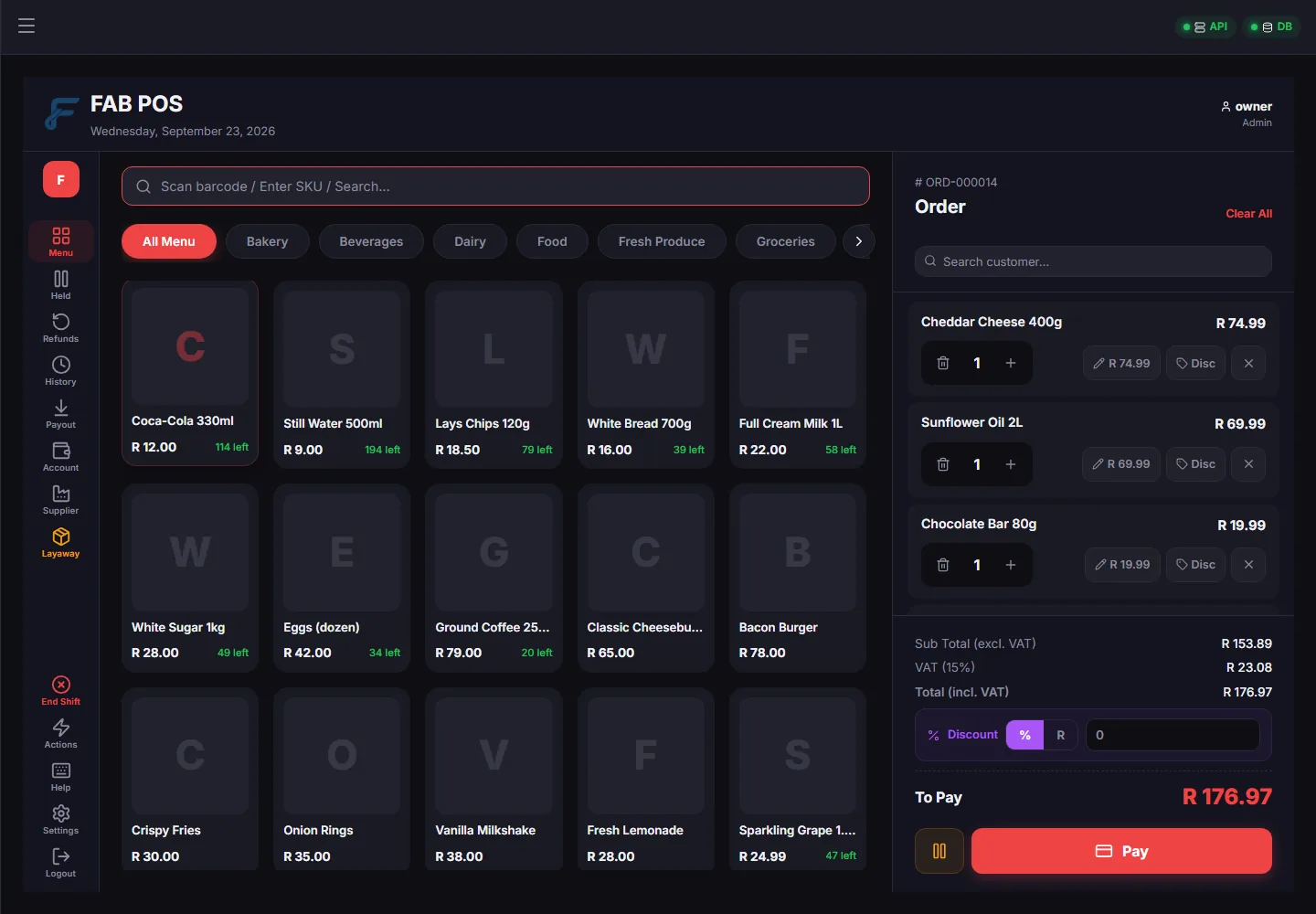
FAB POS is the till, the stockroom and the back office in one — built for the way South African shops actually trade.
Scan, type or tap. Every action has a key — F10 to pay, F1–F4 for cash, card, EFT and gift card — and big touch buttons for touch screens. Split tenders, cash back, holds and layaways included.
Every movement — a sale, a delivery, a stock take, a write-off — is recorded with who did it and why. Stock locations, goods received, purchase orders and low-stock alerts.
Shifts with opening floats, payouts and a drawer count checked against one clear formula. The day end gathers every shift, sale and refund, so nothing is left out.
Account customers with payment terms and a debtors list that shows who is due and who is overdue. Loyalty points, stamp cards and gift cards to bring people back.
Promotions and specials, customer price lists, and pack sizes with their own barcodes — sell a single, a six-pack or a case. A guard stops an item going out at R0 or below cost by mistake.
Quotations, sales orders, tax invoices, delivery notes and customer statements, printed or emailed. Receipts on 80 mm or 58 mm slips, or A4 — per document, per printer.
Sell by the kilogram with scale barcodes and PLU codes. Track big-ticket items by serial number, and search by part or model number.
Tables and waiters, menus, item modifiers and sale types such as dine-in, takeaway and delivery. Recipes that use up their ingredients from stock.
Sales, profit margins and stock valuation, filtered your way and exported to Excel or PDF. A dashboard with today’s takings, profit and top sellers at a glance.
Real screens from FAB POS running a demo shop. Click any picture to see it full size.
Press F10 and the payment window opens with the amount ready. F1 cash, F2 card, F3 EFT — split the bill, give cash back or put it on layaway, all without touching the mouse.
Today’s takings, profit and orders the moment you sign in, with the month’s trend, your best sellers and anything that is running low.
A step-by-step setup guide in plain words. Choose what kind of shop you run and FAB POS shows the fields that trade uses and hides the ones it does not. Stop half-way and carry on tomorrow, from any till.
Choose your kind of shop and FAB POS switches on what that trade normally needs.
A till is only as good as its numbers. FAB POS is designed so they can be checked, traced and trusted.
The server works out every total again from the lines, and refuses a sale that does not agree.
Completed sales cannot be edited. Mistakes are put right with a refund or an adjustment that stays on record.
Every role gets exactly what it needs. When a cashier needs a discount or a refund, a manager approves it with a PIN.
Who changed what, when, and from what to what — kept separately, so the history is always there.
No separate database to install and no technical setup. The installer brings everything FAB POS needs.
Run it and follow the setup guide: your business, your VAT, your staff and your products.
Every feature, for 30 days, with a reminder in the last week. Then buy your licence (FAB POS links to it from the sign-in screen) and activate — everything you have entered stays.
A subscription for each computer, paid monthly or yearly, plus the add-ons your shop uses. Tick what you need and see your price straight away.
Each extra computer costs less
Loading the latest prices…
The prices could not be loaded just now. Please try again later, ask us for a quote or call 076 530 8467.
Your account page shows the price before you pay.
FAB POS reminds you during the last week. After day 30 it becomes read-only: you can still look everything up, run reports and print, but you cannot ring up new sales until your licence is in. Buy your licence here (FAB POS also links to it from the sign-in screen), then paste the activation key from your Fabtech account page under Settings → License. Nothing is deleted — every product, sale and customer you entered during the trial is still there.
No. The tills talk to the FAB POS server on your own network, so you keep ringing up sales when the internet is down. The internet is only needed to check your licence and to email documents.
Yes. One computer runs the FAB POS server and the other tills connect to it over your network. Each computer is licensed separately.
Yes. Fill in the Excel template — products, suppliers and customers — and FAB POS checks it and shows you what will happen before anything is saved.
A subscription for each computer that runs FAB POS, paid monthly or yearly — and each extra computer costs less. Add only the add-ons your shop uses — the restaurant package, layaways, gift cards, stock takes and more — priced per shop, not per computer. A once-off provisioning fee is charged on your first purchase. See the prices and build your own, then sign up and buy online.
Your data stays on your own computer. FAB POS makes backups on demand and signs in every user with their own login. Keep a backup somewhere other than the shop computer, too.
Every feature, no card needed. Install it today and ring up your first sale this afternoon.